

 Web App
Frequently asked Questions
Where can I get the App?
For iPhones and iPads, please head to the App Store, for Android devices please use the Google Play Store. All other devices - including Mac and PC - can use the Web App directly.
Where can I get username and password?
The App is provided exclusively to participants of the G20 summit 2017 in Hamburg. If you are part of the media, there should be instructions to register for the app in your welcome package. If not, the dpa desk in the media center will be able to help you.
I have both a tablet and a mobile phone. Can I use them both?
You’re very welcome to do so. Your password and username will work across devices.
Is there a version for Windows Mobile or Blackberry?
Unfortunately not. But you may use the Web App, which will work on any device with a browser - it looks great on your laptop, too.
I’ve lost my password!
Maybe you still have the email we sent you with the password? If not, please ask for help at the dpa desk in the media centre.
I see only german news!
By default, the english news sections are sorted below the german sections on the app’s home page. But that’s easy to change. Please see the next section to learn how to change the home page.

Functions
Search
On Android und iOS devices, you may access the search in the “Latest News” section (“Aktuelle Nachrichten” in the german section) on the start page of the app. Please tap on the magnifying glass to enter the search term.
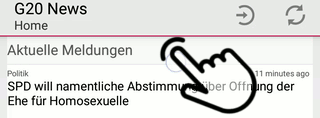
Click or tap image to view animation
In the Web App, please tap or click the magnifying glass on top of the home page’s “Latest News” section to search.

Changing the home page
If you double tap on the section header, the section can be moved around. You can use this if you want to reorder the sections, for example to have the english news at the bottom.
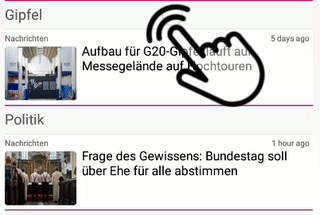
Click or tap image to view animation

Fragen und Antworten
Wo erhalte ich die App?
Die Apps für iPhones und iPads im App Store, für Geräte mit dem Android-Betriebssystem im Google Play Store.
Wie erhalte ich ein Login?
Die App steht nur Teilnehmern des G20-Gipfels in Hamburg zur Verfügung. Im Pressezentrum erhalten Sie weitere Informationen.
Ich habe ein Tablet und ein Mobiltelefon - kann ich die App zweimal installieren?
Gerne! Ihr Zugangsdaten sind auf allen Geräten gleich.
Gibt es die App auch für Windows Mobile oder Blackberry?
Leider nicht. Aber Sie können die Web App verwenden.
Mein Login ist verlorengegangen!
Bitte wenden Sie sich an den dpa-Desk im Pressezentrum.
Gibt es die Nachrichten auch auf Englisch?
Ja, auf der Homepage nach den deutschen Nachrichten. Umsortieren ist übrigens ganz leicht, siehe nächster Abschnitt unter Konfigurieren der Homepage.
Funktionen
Suche
Bei Android und iOS ist Suche im Abschnitt “Aktuelle Nachrichten” bzw. “Latest News” (englische Version) verfügbar. Um die Suche zu öffnen, gehen Sie bitte auf die Homepage und tippen Sie einmal auf die Abschnittsüberschrift “Aktuelle Nachrichten” bzw. “Latest News”, dann auf die Lupe
Klicken oder Tippen Sie auf das Bild, um eine Animation zu sehen.
Um in der Web App zu suchen, tippen oder klicken Sie bitte auf die Lupe neben der Überschrift “Aktuelle Meldungen” auf der Homepage.

Konfigurieren der Homepage
Wenn sie auf der Homepage zweimal kurz hintereinander auf eine Abschnittsüberschrift tippen, können Sie den entsprechenden Abschnitt verschieben.
Klicken oder Tippen Sie auf das Bild, um eine Animation zu sehen.